




|
Name |
AfterFocus Pro |
|---|---|
|
Category |
Photography |
|
Developer |
MotionOne |
| Last version | 2.3.0 |
|
Updated |
|
|
Compatible with |
Android 5.0 + |
Introduction to AfterFocus Pro APK
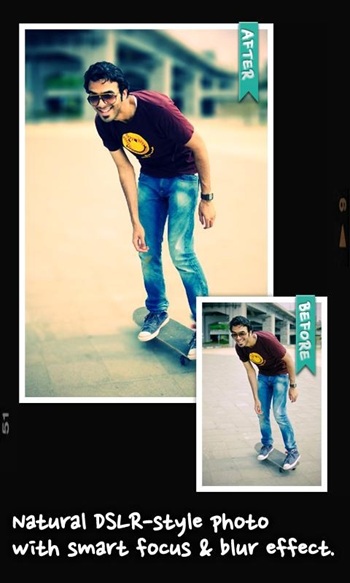
AfterFocus Pro works as a dedicated camera and editing tool that helps Android users create photos with a clear subject and a soft background. It recreates a DSLR-style depth effect without requiring any special equipment, which makes it practical for everyday shots. The layout is simple, so anyone can adjust the blur in a few taps.
The app centers on subject selection. You can tap the main object, trace around it, or let the smart detection handle most of the work. Once the subject is set, the background blur feels smooth and natural. This approach helps users create cleaner compositions and remove distracting elements.
Another part of the app focuses on filters and editing tools. They give photos a different tone without making them look overly processed. The options stay easy to understand, so users do not have to learn complex editing techniques. It’s friendly for people who usually stick to their default camera.
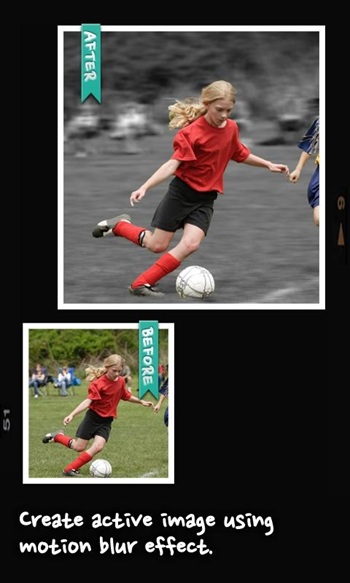
Motion blur is also included for users who want a sense of movement in their shots. This effect is rare in simple editing apps because it usually requires advanced camera settings. Here, the effect can be applied with direct controls, making it useful for action shots or creative projects.
The app feels comfortable to use thanks to its layout. The main tools sit on the home screen, so users don’t need to dig through menus. Photos can be saved quickly or sent to other apps. This helps people who post often and need results fast.
There are limitations. The app relies on manual selection at times, which might take practice. Some images with complex edges may require extra adjustments to look clean. Users with older devices might notice slower processing on heavier effects.
AfterFocus Pro works well for people who want better portrait photos, social media content creators, hobbyists learning mobile photography, and anyone who wants simple depth effects without editing skills. It fits casual daily use as well as creative projects that need clean background separation.
FAQs AfterFocus Pro
What is AfterFocus Pro?
+
AfterFocus Pro is a mobile photography app for Android that helps users create sharp subjects with smooth background blur effects.
How does AfterFocus Pro create background blur?
+
It uses manual or smart subject selection to separate the main object, then applies adjustable blur to the rest of the image.
Does AfterFocus Pro work on older Android phones?
+
Yes, but some heavier effects may process slower on devices with limited performance.
Is AfterFocus Pro suitable for beginners?
+
Yes, the interface is simple and the tools are easy to understand, making it friendly even for first-time editors.
Can AfterFocus Pro handle motion blur effects?
+
Yes, it includes a motion blur option that adds movement to photos without requiring advanced camera knowledge.
Discover More Interesting Apps
-
 Mod
Mod
PhotoRoom
v2026.22.03
147.82 Mb
Updated -
Mod
Lensa
v6.3.2+865
148.53 Mb
Updated -
Mod
AirBrush
v8.9.0
424.95 Mb
Updated -
Photo Lab PRO Picture Editor
v3.13.77
35 MB
Updated -
AI Marvels
v2.4.0
184.26 Mb
Updated -
Mod
Hypic
v8.7.0
265.38 Mb
Updated -
Mod
Clone AI
v8.8.0
98.46 Mb
Updated -
Mod
PREQUEL
v2.1.0
144.28 Mb
Updated -
Mod
LightX Pro
v2.5.6
146.16 Mb
Updated -
Mod
GPS Map Camera
v1.9.17
46.16 Mb
Updated








Share Your Thoughts